How-to-Build-a-Hybrid-SDI-and-IP-Video-Production-System
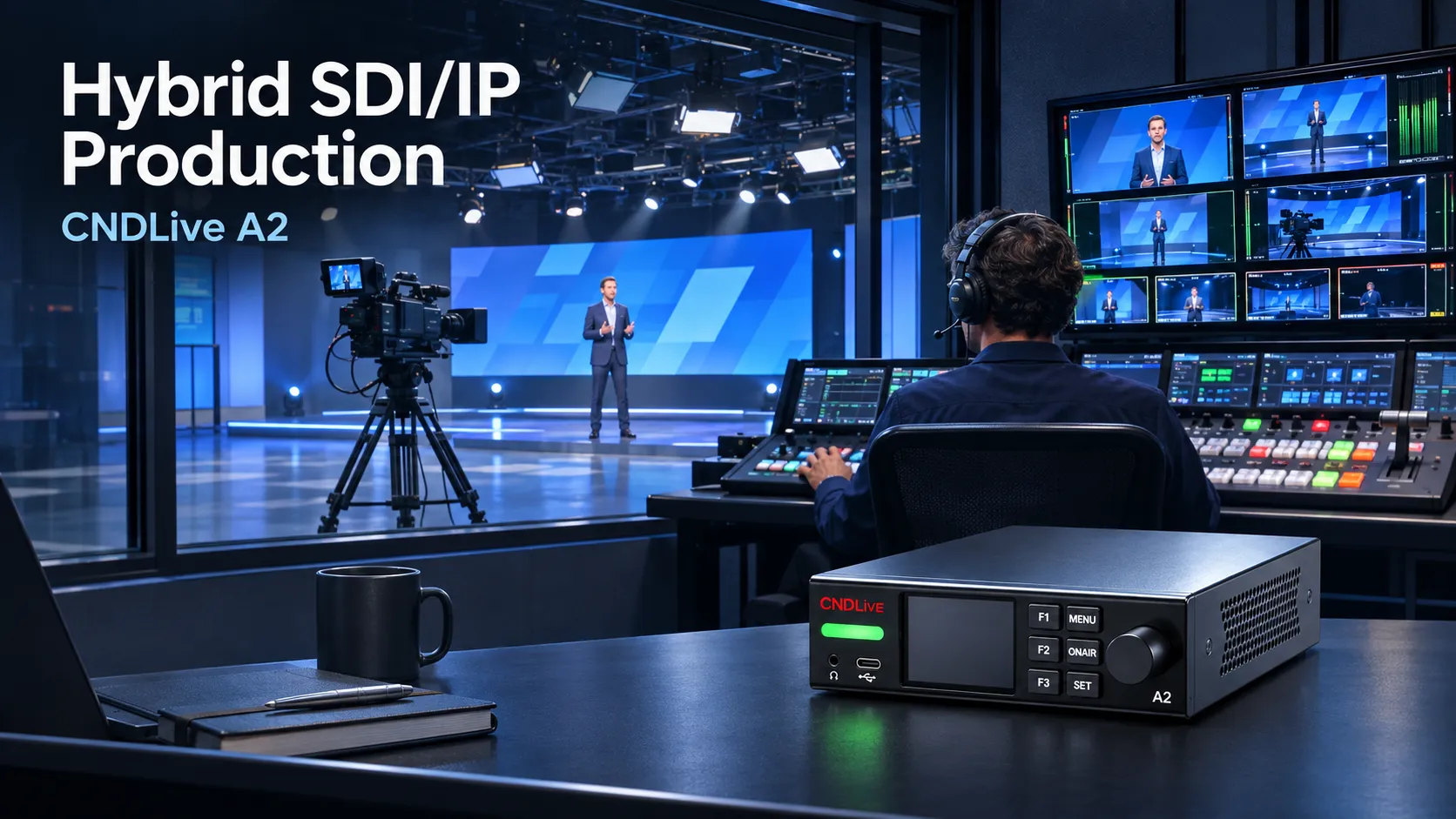

Modern video production environments increasingly combine traditional SDI equipment with IP-based video technologies. From broadcast studios and live event venues to corporate production facilities, teams are looking for ways to connect different video sources, simplify signal distribution, and expand production capabilities without replacing their entire existing infrastructure.
A hybrid SDI and IP video production system provides a practical approach to this transition. By combining established SDI connections with network-based video transport, production teams can retain compatible legacy equipment while introducing more flexible IP workflows.
However, building a reliable hybrid system involves more than adding a few video converters or connecting devices to an Ethernet switch. It requires careful planning of signal paths, conversion points, network capacity, audio integration, and equipment compatibility.
This guide explains how to design and build a hybrid SDI/IP video production system, covering its essential components, system architecture, integration methods, and key considerations for selecting the right equipment.
1. Why Are Production Teams Moving Toward Hybrid SDI and IP Video Workflows?
SDI has been a fundamental technology in professional video production for decades. Its dedicated connections, predictable signal paths, and straightforward installation make it a reliable choice for connecting cameras, production switchers, monitors, and recording equipment.
At the same time, IP-based video technologies have introduced new possibilities for signal distribution and production flexibility. Instead of relying exclusively on dedicated point-to-point video connections, network-based workflows can distribute video sources across compatible devices using existing Ethernet infrastructure.
For many production facilities, however, moving entirely from SDI to IP is neither necessary nor economically practical. This is why hybrid SDI/IP architectures have become an attractive option.
1.1 Preserving Existing SDI Equipment Investments
Many professional production environments already have substantial investments in SDI cameras, video switchers, monitors, and recording equipment.
Replacing all these devices simply to adopt an IP-based workflow can increase project costs and create unnecessary operational disruption.
A hybrid architecture allows production teams to retain existing SDI equipment while introducing IP connectivity where it provides clear operational benefits.
For example, an SDI camera can continue delivering its video output through its existing SDI interface. By adding an appropriate SDI-to-IP encoder, its video feed can also become available to compatible production software and network-connected devices.
This approach helps organizations modernize their workflows gradually rather than undertaking a complete infrastructure replacement.
1.2 Improving Video Distribution Flexibility
Traditional SDI connections generally require dedicated physical connections between signal sources and destinations. As the number of cameras, monitors, and production locations increases, managing these connections can become increasingly complex.
IP-based video workflows offer a different approach. Compatible video streams can be made available across a network, allowing multiple authorized production endpoints to access and use video sources without requiring a separate direct SDI connection for every destination.
This flexibility can be particularly useful in:
- Multi-camera live event production.
- Broadcast studios with multiple production rooms.
- Corporate video facilities.
- Educational institutions with distributed recording spaces.
- Production environments that require centralized video monitoring.
The exact capabilities depend on the IP video protocol, network configuration, and receiving equipment.
1.3 Supporting a Gradual Transition to IP-Based Production
Adopting IP video does not necessarily mean abandoning SDI.
A production facility may continue using SDI for camera connections and local video monitoring while introducing IP transmission for remote monitoring, software-based production, or video distribution between rooms.
Over time, additional IP-enabled cameras, encoders, decoders, and production systems can be integrated as operational requirements evolve.
This gradual approach offers several advantages:
- Lower initial infrastructure replacement costs.
- Greater flexibility when introducing new production equipment.
- Better utilization of existing SDI devices.
- More opportunities to expand production capabilities.
- A smoother transition for technical teams learning IP-based workflows.
Ultimately, the goal of a hybrid system is not to make every signal IP-based. It is to use SDI and IP technologies where each is most appropriate for the production environment.
2. Understanding the Core Components of a Hybrid SDI/IP Video System
Before designing a hybrid production architecture, it is important to understand the different devices and infrastructure components involved.
A typical system includes SDI video sources, IP-enabled production equipment, network infrastructure, and conversion devices that connect the two environments.
2.1 SDI Video Sources and Production Equipment
SDI equipment forms the traditional video production layer of a hybrid system.
Common devices include:
- SDI cameras: Capture live video and deliver signals through SDI outputs.
- Video production switchers: Receive multiple video sources and switch between them to create program outputs.
- Professional monitors: Display video signals for camera operators, directors, and technical staff.
- SDI recorders: Capture video for post-production, archiving, or later distribution.
- SDI routers and distribution equipment: Route video signals between different production devices.
These devices can continue operating through their existing SDI connections. The introduction of IP video does not require every SDI endpoint to be replaced with a network-native alternative.
Instead, selected signals can be converted into IP streams when they need to enter a network-based workflow.
2.2 IP-Based Video Devices and Network Infrastructure
The IP layer connects compatible network-based production devices and distributes video streams across the production environment.
Typical components include:
- NDI-enabled cameras: Generate video streams that can be discovered and accessed by compatible NDI receivers.
- IP video encoders: Convert video inputs into network-transmitted streams.
- IP video decoders: Convert compatible network streams into physical video outputs.
- Production computers: Run video switching, recording, monitoring, and streaming applications.
- Ethernet switches: Connect network devices and transport video traffic between endpoints.
- Management software: Configure devices, monitor connectivity, and manage video sources.
The Ethernet network is an essential part of this architecture. Its switching capacity, port speeds, topology, and configuration must support the expected number of video streams.
It is also important to recognize that not all IP video technologies operate in the same way. NDI, SMPTE ST 2110, and other IP video transport approaches have different requirements for encoding, discovery, synchronization, and network design.
They should therefore be evaluated according to the intended production workflow rather than treated as interchangeable technologies.
2.3 SDI-to-IP and IP-to-SDI Conversion Devices
Conversion devices act as gateways between traditional SDI equipment and IP-based production environments.
Their main purpose is to translate video signals between compatible physical interfaces and network video formats.
There are two fundamental conversion directions.
SDI-to-IP Encoding
An SDI camera or other video source connects to an encoder through its SDI input. The encoder processes the incoming signal and makes the corresponding video stream available over the IP network.
A typical signal path looks like this:
SDI Camera → SDI-to-IP Encoder → Ethernet Network → Compatible IP Receiver
This allows an existing SDI video source to participate in a network-based production workflow.
IP-to-SDI Decoding
An IP video decoder receives a compatible network stream and converts it into an SDI output.
A typical signal path looks like this:
IP Video Source → Ethernet Network → IP-to-SDI Decoder → SDI Monitor or Switcher
This is useful when a production team needs to deliver network-based video to equipment that only accepts SDI inputs.
Bidirectional Conversion
Some devices combine encoding and decoding capabilities in one endpoint. Depending on their design, they can support both SDI-to-IP and IP-to-SDI workflows.
This can simplify installations where production equipment needs to exchange signals across SDI and IP connections.
For more demanding workflows, simultaneous encoding and decoding can be especially useful because both signal directions remain available without requiring the operator to switch the device between separate operating modes.
The specific number of supported inputs, outputs, simultaneous streams, resolutions, and protocols should always be checked against the device specifications.
3. How to Design a Hybrid SDI and IP Video Production Architecture
Once the essential components are identified, the next step is to design the signal flow and determine how SDI and IP equipment will work together.
A good hybrid architecture should reflect the actual production requirements rather than simply connecting every available device to the same network.
The following steps provide a practical starting point.
3.1 Map Out Your Existing SDI Infrastructure
Start by documenting the equipment already installed in the production environment.
Identify:
- The number and types of SDI cameras.
- Available SDI inputs and outputs on production switchers.
- Existing SDI monitors and recording devices.
- Current SDI routing and distribution arrangements.
- Video formats and resolutions supported by each device.
Next, identify which signals need to become available over IP.
For example, a production studio may want to make several SDI camera feeds accessible to a software-based production workstation while keeping the existing SDI switcher and monitoring equipment in operation.
In this case, only the camera signals that need network access may require SDI-to-IP conversion.
This avoids unnecessary equipment purchases and keeps the existing production workflow intact.
3.2 Define the IP Video Workflow
After mapping the SDI infrastructure, determine how network-based video will be used.
Consider the following questions:
- Which video sources need to be accessible over the network?
- Which production devices will receive the IP streams?
- Do network video sources need to be converted back to SDI?
- Will video be distributed within one room, across multiple rooms, or between different locations?
- How many video streams will operate simultaneously?
- Which IP video protocols are supported by the existing production software and hardware?
These decisions help determine the required encoders, decoders, network switches, and software.
For example, a production team using NDI-compatible software may choose NDI-enabled encoders to bring existing SDI cameras into its production environment.
A different facility using a broadcast infrastructure based on SMPTE ST 2110 would require gateways and network equipment designed for that standard.
The intended IP video ecosystem must be established before selecting conversion equipment.
3.3 Choose the Right Conversion Points
Not every SDI signal needs to be converted into IP, and not every IP stream needs to be converted back into SDI.
The most efficient architecture places conversion devices where they solve a specific connectivity or distribution requirement.
The following table illustrates four common signal paths.
| Signal flow | Conversion requirement | Typical application |
|---|---|---|
| SDI → IP | SDI encoding | Making existing SDI camera feeds available to IP production software |
| IP → SDI | IP decoding | Sending network video to an SDI monitor or switcher |
| SDI → IP → SDI | Encoding and decoding | Transporting video between SDI devices through an IP network |
| USB → IP | USB/UVC-to-IP conversion | Integrating compatible USB cameras into a network video workflow |
For instance, if an existing SDI camera needs to send video to a production workstation in another room, an SDI-to-IP encoder can be installed near the camera.
If the workstation also needs to send a network video source to an SDI monitor, a decoder can be installed at the receiving end.
This approach creates a clear division between the SDI equipment layer and the IP distribution layer.
It also makes future expansion easier because additional conversion endpoints can be introduced when new signal paths are required.
3.4 Design for Simultaneous Encoding and Decoding
Another important consideration is whether the system needs to encode and decode video at the same time.
Some production environments require both directions simultaneously.
For example, a production workstation may need to receive an SDI camera feed as an IP stream while also sending a different IP video source back to an SDI monitor or switcher.
Using separate encoding and decoding devices can achieve this, but it may increase equipment requirements, cabling, power connections, and installation complexity.
A bidirectional converter with simultaneous encoding and decoding capabilities can provide a more integrated solution.
When evaluating such equipment, check whether the device supports both operations concurrently or merely allows users to switch between encoding and decoding modes.
Also verify the maximum supported resolution and frame rate for simultaneous operation, as these specifications can differ from the maximum resolution supported by an individual encoding or decoding function.
For a professional hybrid production system, the ideal architecture is one that provides the required signal paths with the fewest unnecessary conversion stages while maintaining compatibility, predictable performance, and room for future expansion.
4. How to Integrate SDI and NDI Devices into One Production Workflow
Once the system architecture is defined, the next step is to connect SDI and IP-based equipment in a way that preserves the strengths of both environments. In an NDI-based workflow, bidirectional converters can act as practical connection points: they bring traditional SDI signals onto the IP network and convert selected network sources back into SDI for existing production equipment.
The goal is not necessarily to replace every SDI connection. Instead, identify where IP distribution adds flexibility and use conversion devices at those points.
4.1 Connecting SDI Cameras to an NDI Network
To make an existing SDI camera available to IP-based production equipment, connect the camera's SDI output to the SDI input of an encoder or bidirectional converter. Then connect the converter to the production network through Ethernet.
A typical signal path looks like this:
SDI camera → SDI-to-NDI converter → Ethernet switch → NDI-compatible production devices
After the source is available on the network, compatible devices and software can discover and receive the video stream, depending on the network configuration and the NDI mode in use.
This arrangement is useful when a production team wants to retain existing cameras but distribute their signals to multiple destinations. For example, one SDI camera feed could be made available to a production computer, a remote monitoring position, and another compatible endpoint without requiring a separate long SDI cable to every destination.
Before deployment, check the following:
- SDI format compatibility: Confirm that the converter supports the camera's output resolution, frame rate, and SDI signal format.
- Signal routing: Determine whether the camera feed also needs to reach a local SDI monitor or switcher. If so, check whether the converter provides an SDI loop-through or another suitable output.
- Network connectivity: Confirm that the converter and receiving devices are connected to networks that can discover and carry the NDI streams.
- Source identification: Use consistent device names and labels so operators can identify cameras and feeds quickly.
For example, a converter with SDI input, output, and loop-through connections can support more than one role in the same installation. The SDI input receives the camera signal, the network connection makes it available to IP-based devices, and an SDI loop output can preserve a local connection where the workflow requires one. The exact routing options depend on the converter's design.
4.2 Sending NDI Sources to SDI Equipment
Hybrid integration also works in the opposite direction. An IP-based source can be converted into SDI when it needs to enter a traditional production switcher, recorder, monitor, or other SDI equipment.
A typical signal path is:
NDI source → Ethernet switch → NDI-to-SDI converter → SDI production equipment
This is particularly useful when a facility has introduced network-based cameras, graphics systems, or software-generated video sources but still relies on an SDI switcher for live production.
For example, a graphics workstation may generate an NDI output that needs to be displayed on an SDI-connected monitor or routed through an existing SDI switcher. An IP-to-SDI conversion point allows the new source to enter that established signal path without requiring the entire production chain to move to IP.
When planning this direction of conversion, consider:
- Output format: The converted SDI signal must match the requirements of the receiving equipment.
- Frame synchronization: Check how the converter and downstream equipment handle frame-rate differences and synchronization. Where frame-accurate switching is required, verify the complete signal chain rather than assuming conversion alone guarantees synchronization.
- Audio routing: Confirm whether embedded audio is carried with the converted signal and whether additional audio connections are needed.
- Operational control: Make sure operators know which network source is mapped to each SDI output, especially when sources change frequently.
A bidirectional converter can be especially useful in a facility where both SDI-to-IP and IP-to-SDI connections are needed. However, bidirectional capability should not be confused with an unlimited number of independent inputs and outputs. Always check the device's actual physical interfaces and supported operating modes.
4.3 Integrating USB Cameras into the IP Workflow
USB cameras are common in meeting rooms, small studios, education environments, and compact live-streaming setups. They can also become useful sources in a larger IP-based production workflow.
Where a converter supports USB/UVC camera input and NDI output, a compatible USB camera can be introduced to the network without first replacing it with a dedicated network camera.
A simplified workflow is:
USB/UVC camera → compatible converter → Ethernet network → NDI production software or endpoint
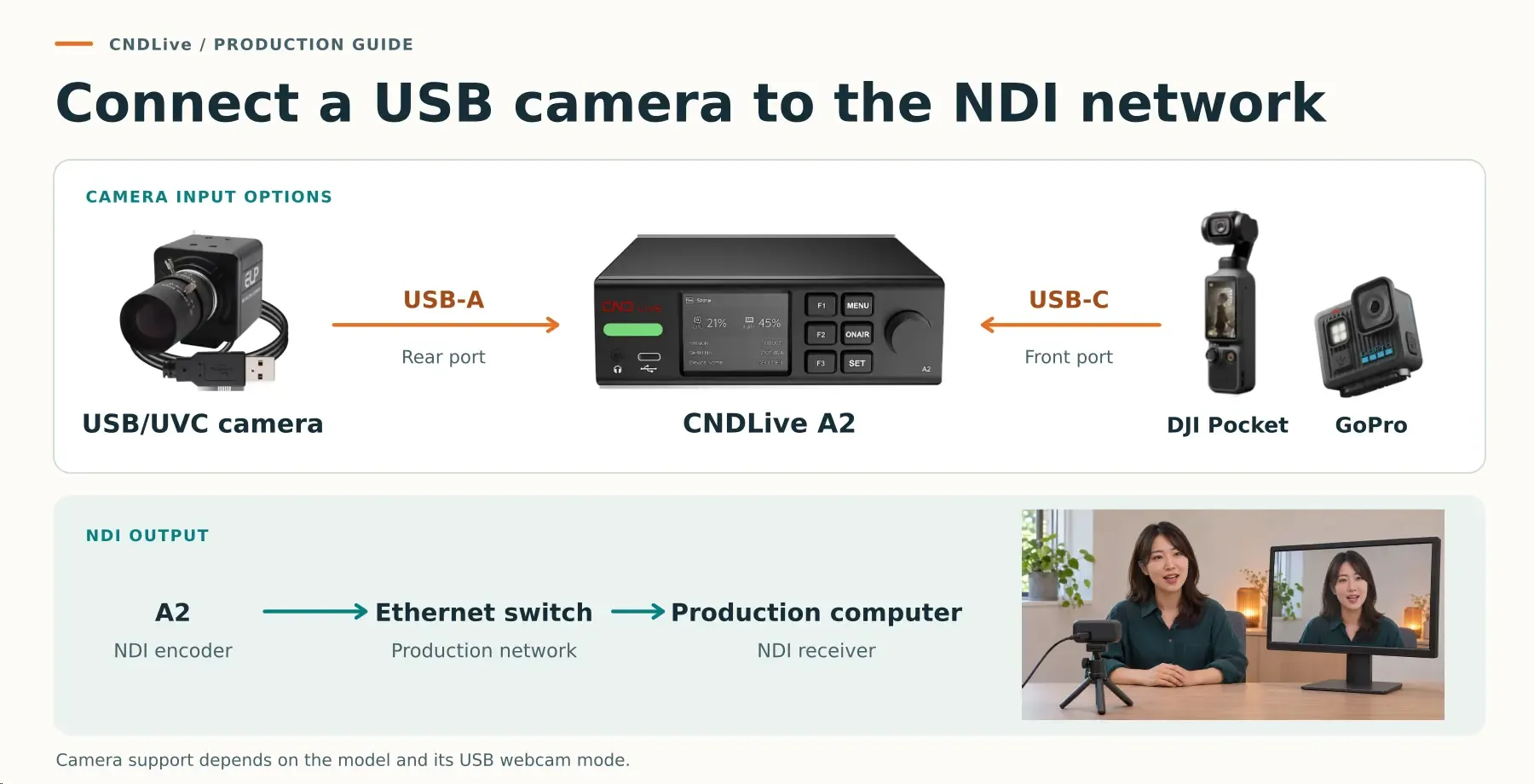
This can help teams combine different types of cameras in one production environment. For example, a fixed SDI camera may cover the main stage, while a USB camera provides a close-up view of a presenter or a secondary angle in a smaller production area.
There are several practical considerations:
- UVC compatibility: Confirm that the camera supports a USB Video Class mode compatible with the converter. Not every USB camera behaves identically.
- Power and cabling: Check the camera's power requirements and the permitted USB cable length. A USB camera may need a separate power supply or an appropriate extension solution.
- Video settings: Verify the camera's supported resolution and frame rate, and confirm which formats the converter accepts.
- Audio source selection: Decide whether audio should come from the camera, an external audio interface, or another part of the production system.
USB-to-NDI integration is best viewed as an additional source option, not a universal substitute for professional SDI cameras. Camera control, image quality, power arrangements, and long-distance cabling requirements may differ significantly.
4.4 Managing Audio Across SDI and IP Connections
Video conversion is only part of a hybrid production system. Audio must also be routed and monitored consistently, particularly when signals move between cameras, switchers, computers, converters, and remote production positions.
In a typical SDI workflow, audio may be embedded in the SDI signal. When that signal is encoded and transported over an IP video workflow, the audio handling depends on the converter and the selected transmission mode. Teams should verify channel support, audio mapping, and synchronization rather than assuming that every conversion path preserves every audio channel in the same way.
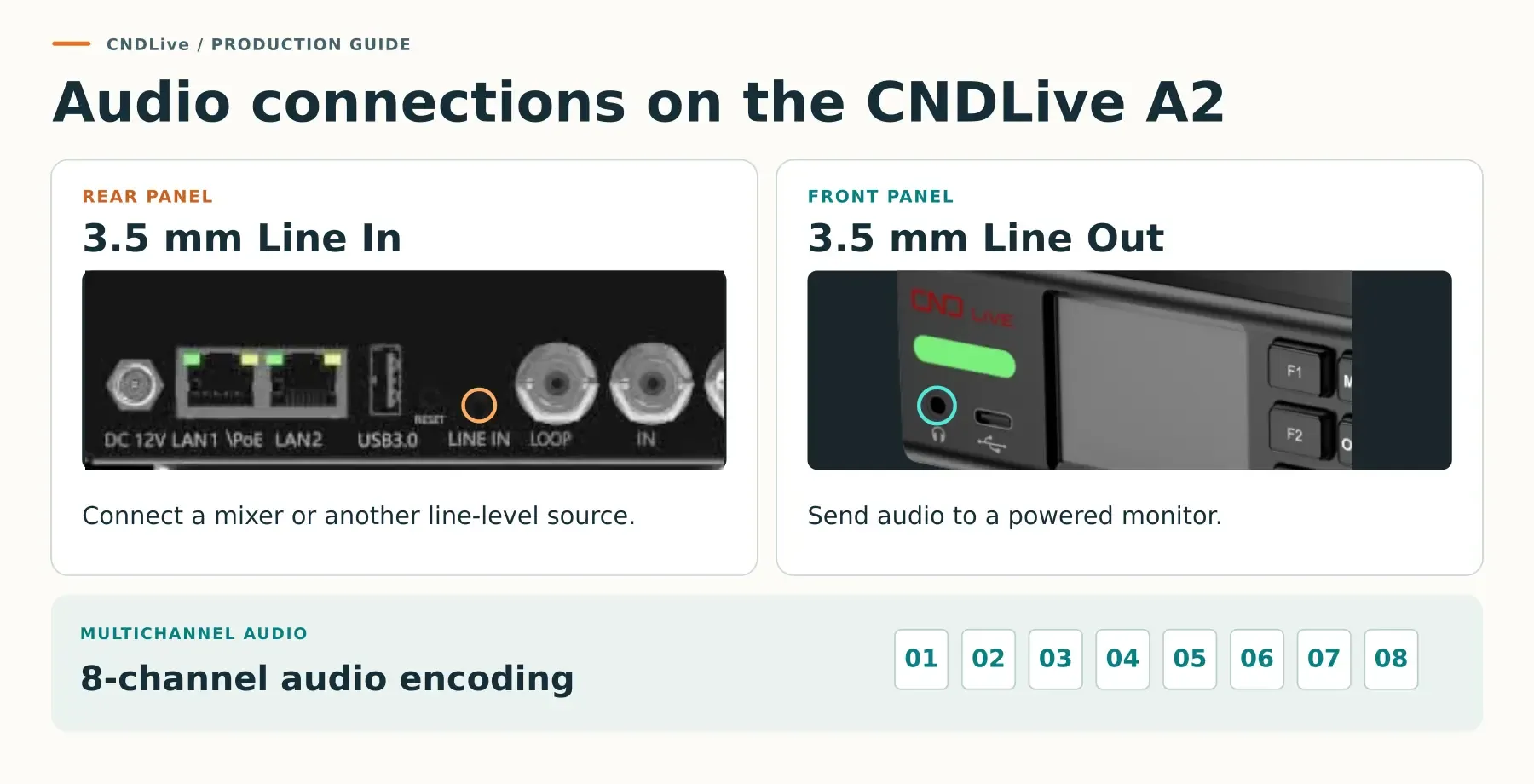
For systems that need additional audio connections, some converters provide dedicated line-level inputs and outputs. These can be useful for connecting external audio equipment or monitoring audio independently of the embedded SDI signal.
A practical audio checklist includes:
- Embedded audio: Confirm how many channels are supported and how they are mapped through the conversion workflow.
- External audio input: Check whether a line input is available when audio needs to enter independently of the video source.
- Audio monitoring: Determine whether a dedicated line output or another monitoring path is available.
- Lip-sync: Test audio and video synchronization at the actual receiving endpoint, especially when different encoding modes or processing paths are involved.
- Intercom: Treat production communication as a separate design requirement. Intercom connectivity and channel support should be checked independently of embedded program audio.
For example, the CNDLive A2 supports 8-channel audio encoding, as well as separate 3.5 mm Line In and Line Out connections. Its USB-A 3.0 interface can also be used with intercom equipment, with support for up to eight intercom terminals through CNDLive Manager. These are distinct capabilities: audio encoding, line-level audio connections, and intercom should be evaluated as separate parts of the system.
5. Network Bandwidth, Latency and Reliability Considerations
Moving video onto an IP network changes how production teams plan signal distribution. Instead of evaluating only the capacity of an individual cable or interface, engineers must consider the combined traffic generated by all video streams, the capabilities of the network switches, and the performance requirements of receiving devices.
A network that works well for ordinary office traffic is not automatically suitable for a multi-camera production environment. Video workflows need predictable capacity, appropriate traffic handling, and a clear understanding of how each device communicates.
5.1 Choosing Between NDI High Bandwidth and NDI HX
NDI offers different transport options for different production requirements. Two commonly considered choices are NDI High Bandwidth and NDI HX.
NDI High Bandwidth is generally selected when maintaining high-quality video with relatively low compression is a priority and the network has sufficient capacity. It can be appropriate for studio environments, high-quality production feeds, and workflows where network infrastructure is designed to carry substantial video traffic.
NDI HX uses more efficient compression to reduce bandwidth requirements. This can make it attractive for installations with many sources, constrained network capacity, or devices where lower data rates are an important consideration. NDI HX implementations include different generations, such as HX2 and HX3, and their performance depends on the encoder, decoder, settings, and supported device capabilities.
The choice should be based on the production requirement rather than the assumption that one mode is always better.
| Consideration | NDI High Bandwidth | NDI HX |
|---|---|---|
| Network demand | Generally higher | Generally lower |
| Compression approach | Lower-compression NDI transport | More bandwidth-efficient compression |
| Typical consideration | Prioritizing image quality and responsive production workflows | Reducing network traffic and supporting more constrained links |
| Key trade-off | Requires more network capacity | Compression and processing characteristics need to be evaluated |
Before selecting a mode, test the actual equipment with the intended resolution, frame rate, and number of concurrent streams. Also consider the receiving software and endpoints: a workflow is only practical when all relevant devices support the chosen NDI mode.
5.2 Calculating Network Bandwidth Requirements
A useful starting point is to estimate the combined bandwidth of all video streams that may travel across the same network link.
At a basic level:
Estimated video traffic = Sum of the bitrates of all concurrent streams
For example, if a production has several cameras, graphics sources, and return feeds, the network must accommodate the traffic generated by those streams along the paths they actually take. A camera feed received by multiple destinations may create different traffic patterns depending on whether the system uses unicast or multicast delivery and how the sending and receiving devices implement it.
The estimate should account for more than the nominal bitrate of one stream. Consider:
- Resolution and frame rate: Higher resolutions and frame rates generally require more data.
- Codec and encoding mode: High Bandwidth and HX workflows can have substantially different bandwidth profiles.
- Number of simultaneous sources: Count the streams that may be active at the same time, not just the number of devices installed.
- Number of receivers: Understand whether each additional receiver creates another stream or whether the distribution method allows shared delivery.
- Network overhead and other traffic: Leave capacity for protocol overhead, control traffic, management, and other network services.
- Peak operating conditions: Include the busiest expected production scenario, not only the average workload.
Avoid designing a network to operate continuously at its theoretical maximum throughput. Leave practical headroom for traffic variation, additional sources, and future expansion. The amount of headroom should be determined through testing and the requirements of the specific installation.
A simple planning table can help:
| Planning item | Questions to answer |
|---|---|
| Video sources | How many cameras, graphics feeds, and other sources will be active? |
| Stream settings | What resolution, frame rate, codec, and NDI mode will each source use? |
| Destinations | How many devices need to receive each source? |
| Network paths | Which switch ports and uplinks will carry the traffic? |
| Capacity margin | Is there sufficient spare capacity during the busiest production scenario? |
For larger systems, map the traffic across individual switch links and uplinks. A network may have enough total capacity on paper but still experience congestion if too many high-bandwidth streams pass through the same link.
5.3 Reducing Latency in IP Video Transmission
Latency matters whenever operators need to monitor live sources, coordinate camera movements, switch between feeds, or synchronize video with audio and other production elements.
In a hybrid SDI/IP system, end-to-end latency is influenced by several stages:
- Video capture and camera processing
- Encoding and compression
- Network transmission and switching
- Decoding and output processing
- Display or downstream equipment processing
The selected NDI mode can affect the processing and transport characteristics of the workflow, but it is only one part of the total latency budget. A fast network cannot eliminate delay introduced by a camera, encoder, decoder, or display.
To keep latency under control:
- Choose an encoding mode appropriate for the required image quality and response time.
- Avoid unnecessary conversion and processing stages.
- Use network switches with sufficient capacity for the expected video traffic.
- Monitor congestion, packet loss, and other network conditions that can affect stream performance.
- Test the complete signal path, from the source camera to the actual display or production endpoint.
For applications such as live switching, confidence monitoring, or interactive production, measure latency under realistic operating conditions. Do not rely solely on a converter's published processing figure, because the complete workflow may introduce additional delay.
5.4 Improving Network Reliability
A hybrid production network should be designed as part of the production infrastructure, not treated as an ordinary office network with cameras attached.
For small installations, a well-configured managed Ethernet switch may be sufficient. As the number of devices and streams grows, network segmentation, traffic monitoring, and more deliberate switching design become increasingly important.
Consider the following practices:
Use managed switches. Managed switches provide visibility and configuration options that are valuable in video environments. They can help engineers monitor port utilization, identify errors, and apply traffic-management features where required.
Plan network segmentation. Separate production video traffic from unrelated office traffic where appropriate. VLANs can help organize devices and control which parts of the network communicate, but they must be configured consistently with the discovery and routing requirements of the chosen video protocol.
Understand multicast requirements. Some IP video workflows use multicast for efficient one-to-many distribution. Where multicast is used, features such as IGMP snooping and a correctly configured IGMP querier may be important. These settings should follow the requirements of the specific protocol and network design; they should not be enabled or changed blindly.
Monitor uplinks and congestion. Check the links between switches as carefully as the ports connected to individual devices. Aggregated video traffic can create bottlenecks at uplinks even when individual access ports appear healthy.
Document device addressing and connections. Maintain a record of device names, IP addresses, switch ports, VLAN assignments, and signal routes. This makes troubleshooting and future expansion easier.
Test failure scenarios. Check what happens if a network cable is disconnected, a switch is restarted, or a source device becomes unavailable. If the production requires redundancy, design and test it explicitly rather than assuming that a single converter or network connection provides failover.
Finally, distinguish between a general NDI-based production network and a broadcast IP infrastructure built around standards such as SMPTE ST 2110. Both use IP networking, but they have different workflow requirements and design considerations. ST 2110 environments, for example, may require precise timing and synchronization using PTP, as well as carefully engineered multicast and network infrastructure. An NDI converter should not be assumed to provide ST 2110 compatibility unless the manufacturer explicitly specifies it.
A reliable hybrid system is therefore the result of coordinated design across the video devices, conversion points, network switches, and operating procedures. Planning these elements together helps prevent avoidable bottlenecks and makes the system easier to maintain as production requirements grow.
6. Practical Applications of Hybrid SDI/IP Production Systems
Hybrid SDI/IP production is not limited to large broadcast facilities. It can be useful anywhere a production team needs to connect established video equipment with newer network-based devices, distribute sources more flexibly, or expand a system without replacing its entire infrastructure.
The ideal architecture depends on the size of the production, the equipment already in place, and how video needs to be distributed.
6.1 Broadcast Studios and Television Production
Many broadcast studios have established SDI infrastructure, including cameras, production switchers, monitors, and recording equipment. Replacing all of these devices at once can be expensive and disruptive.
A hybrid approach allows studios to retain their existing SDI signal paths while introducing IP connectivity where it provides practical benefits.
For example, an SDI camera feed can be converted into an NDI source and made available to a production workstation, remote monitoring position, or another compatible device on the network. At the same time, an NDI graphics feed or computer-generated source can be converted back to SDI for use with an existing production switcher.
This arrangement can help studios:
- Extend the reach of existing camera and production equipment.
- Distribute video sources to additional workstations without installing a separate SDI connection for every destination.
- Introduce network-based graphics and monitoring tools.
- Expand production capacity in stages while retaining established workflows.
For larger broadcast facilities, it is important to distinguish between an NDI-based hybrid workflow and a facility-wide broadcast IP infrastructure such as SMPTE ST 2110. The appropriate architecture depends on the required production standards, synchronization, redundancy, and network design.
6.2 Live Events and Multi-Camera Production
Live events often involve cameras positioned at different locations, control rooms, stage areas, and auxiliary production spaces. Running dedicated SDI cables from every source to every destination can become complicated, particularly when the production needs to change frequently.
An IP-based distribution layer can simplify some of these connections.
For example, a live event production might use:
- SDI cameras for the main stage and close-up shots.
- NDI-compatible devices for additional camera angles or graphics sources.
- A production workstation to receive and manage network video sources.
- SDI outputs to feed existing switchers, recorders, or venue displays.
A hybrid system makes it possible to combine these sources without requiring every device to use the same physical video interface.
This can be especially valuable for temporary productions, where equipment needs to be installed, configured, and dismantled within a limited time. Network-based source distribution may reduce the number of dedicated point-to-point video connections required, although the network itself still needs sufficient capacity and appropriate configuration.
6.3 House of Worship and Educational Broadcasting
House of worship facilities and educational institutions often have a mixture of equipment acquired over several years. A typical installation might include SDI cameras, a video switcher, computers for presentation graphics, recording equipment, and network-connected streaming systems.
A hybrid SDI/IP workflow can connect these components while allowing the organization to upgrade gradually.
For example, a school may continue using its existing SDI cameras while adding an NDI-based computer graphics source for presentations. A house of worship may distribute camera feeds to additional monitoring or streaming positions without redesigning the entire video system.
The main advantages include:
- Flexible source distribution: Make selected video sources available to compatible network devices.
- Gradual equipment upgrades: Introduce IP-based cameras, computers, and production tools over time.
- Simplified expansion: Add new receiving positions where network capacity and device compatibility permit.
- Better integration: Connect traditional video equipment with software-based production and streaming workflows.
For organizations with limited technical staff, ease of configuration and centralized device management can also be important selection criteria. A system that is easy to monitor and troubleshoot can be more valuable in daily operation than one that offers features the team rarely uses.
7. How to Choose the Right Equipment for a Hybrid SDI/IP System
The performance of a hybrid production system depends on more than the number of interfaces available on a converter. Equipment should be evaluated according to the actual signal paths, network requirements, operational needs, and future expansion plans.
The following factors can help production teams compare potential solutions.
7.1 Check Video Interface Compatibility
Start by listing the physical video interfaces used throughout the production environment.
For SDI equipment, check:
- Supported SDI standards and signal formats.
- Maximum resolution and frame rate.
- Available input, output, and loop-through connections.
- Whether embedded audio needs to be preserved.
For IP-based equipment, check:
- Supported video protocols and NDI modes.
- Compatibility with the production software and receiving devices.
- Available network interfaces and connection speeds.
- Whether the device supports the required encoding and decoding directions.
Do not evaluate a converter simply by counting its connectors. A device with SDI input, output, and loop-through connections may serve several purposes, but these interfaces do not necessarily represent three independent video inputs.
Compatibility should be verified across the complete signal path, from the source device to the final destination.
7.2 Evaluate Encoding and Decoding Capabilities
A hybrid system may need to perform two different tasks:
- Encode an SDI or USB video source and make it available over IP.
- Decode an IP-based video source and deliver it to SDI equipment.
If both directions are required, a bidirectional converter may reduce the number of separate devices needed.
However, check whether encoding and decoding can operate simultaneously, and identify the maximum supported resolution and frame rate under that operating condition.
Other useful specifications include:
- Supported NDI modes, such as NDI High Bandwidth and NDI HX.
- Supported compression formats, such as H.264 and H.265.
- Maximum encoding and decoding resolution.
- Compatibility with the intended production software.
- Configuration options for different source and output requirements.
A higher specification is not automatically a better investment. The important question is whether the device can support the actual video formats and workflows required by the production.
7.3 Consider Audio and Communication Requirements
Audio requirements should be assessed alongside video connectivity.
A production team may need to transport embedded SDI audio, connect an external audio source, monitor audio independently, or provide communication between camera operators and production staff.
These requirements should be evaluated separately:
| Requirement | What to check |
|---|---|
| Embedded audio | Supported channel count and audio mapping |
| External audio input | Availability and type of audio input |
| Audio monitoring | Dedicated output and monitoring options |
| Audio synchronization | Lip-sync performance across the complete workflow |
| Intercom | Supported equipment, number of terminals, and communication workflow |
A converter that supports multi-channel audio encoding may not necessarily provide a complete intercom system. Likewise, a dedicated line output should not be confused with an intercom connection.
Understanding these differences helps avoid purchasing additional equipment later to fill gaps in the original design.
7.4 Look for Flexible Configuration and Centralized Management
In a production environment with multiple converters and network endpoints, device management can become a significant operational task.
Engineers may need to check IP addresses, configure encoding parameters, select sources, monitor output status, and troubleshoot connections. Having to configure every device individually can become inefficient as the system grows.
Useful management capabilities include:
- Local configuration through a device display or physical controls.
- Remote access to device settings.
- Clear device identification and IP address information.
- Source and output monitoring.
- Visibility into network connectivity and bandwidth.
- Centralized management of multiple compatible devices.
These features can reduce setup time and make routine maintenance easier, particularly for installations with several production rooms or distributed equipment positions.
7.5 Compare Total Deployment Costs
The initial purchase price of a converter is only one part of the total deployment cost.
A more useful comparison considers the full system:
- Number of converters and other endpoint devices required.
- Ethernet switches, cabling, and network upgrades.
- Power supplies or PoE infrastructure.
- Additional audio and intercom equipment.
- Software licensing and device management.
- Installation, configuration, and ongoing maintenance.
- Future expansion and replacement requirements.
For example, a bidirectional converter may reduce the number of separate encoding and decoding devices required in a workflow. However, this advantage depends on the actual number of simultaneous signal paths and the device's supported operating modes.
A practical purchasing decision should compare the cost of the complete proposed workflow, not just the price of individual devices.
8. Building a More Flexible Hybrid Workflow with CNDLive A2
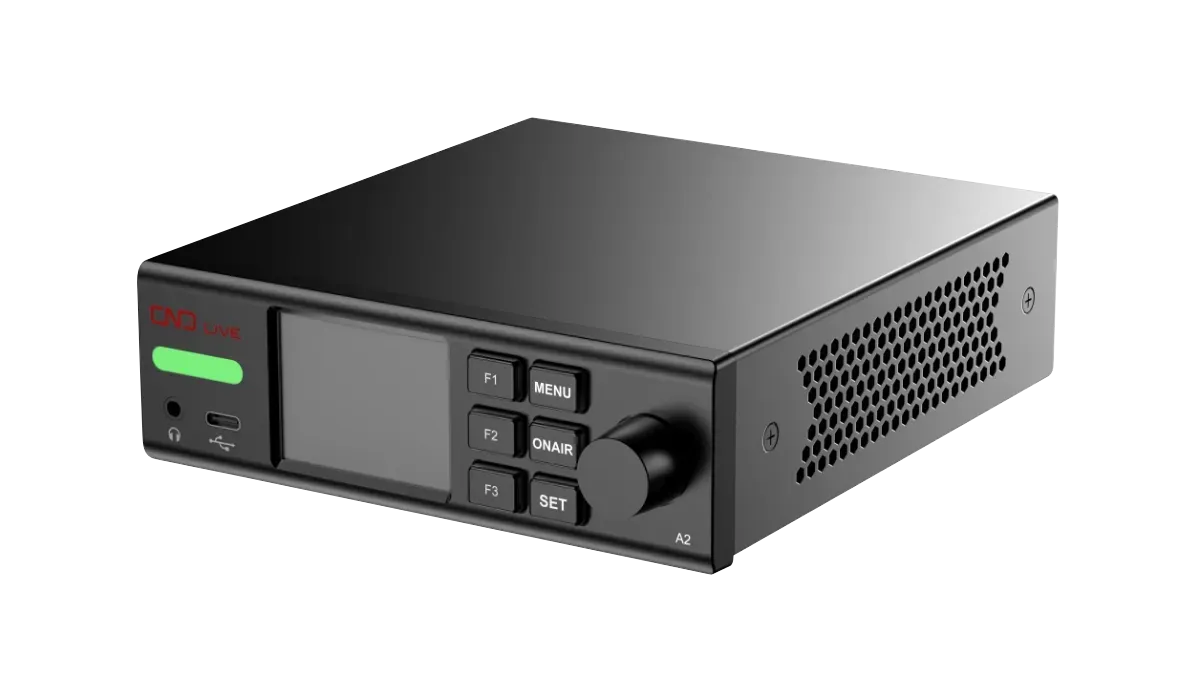
For production teams looking to connect existing SDI equipment with an NDI-based IP workflow, the CNDLive A2 SDI Bi-Directional NDI Converter provides a compact endpoint for video conversion and distribution.
[[How-to-Build-a-Hybrid-SDI-and-IP-Video-Production-System/images/2214861fdddc746160f14b2cdc083738_MD5.webp|Open: cndlive-a2.webp]] ![[How-to-Build-a-Hybrid-SDI-and-IP-Video-Production-System/images/2214861fdddc746160f14b2cdc083738_MD5.webp]]
Rather than requiring an immediate replacement of existing SDI equipment, A2 can help introduce IP connectivity at selected points in a production system.
Connecting SDI and NDI Workflows
A2 provides three 3G-SDI interfaces: SDI IN, SDI OUT, and SDI LOOP. These connections support integration with traditional SDI equipment, while its network connectivity enables supported IP video workflows.
The device supports NDI High Bandwidth, NDI HX2, NDI HX3, and OMT, providing options for different production and distribution requirements.
It also supports simultaneous encoding and decoding at up to 1080p60, making it suitable for workflows that need both SDI-to-IP and IP-to-SDI conversion within the same production environment.
Supporting Different Video Sources
In addition to SDI connectivity, A2 supports USB/UVC camera input to NDI. This gives production teams another way to introduce compatible USB cameras into an IP-based workflow.
Its H.264 and H.265 compression support provides additional encoding options, depending on the selected workflow and operating mode.
Handling Audio and Production Communication
Audio is another important part of A2's integration capabilities. The device supports 8-channel audio encoding and provides separate 3.5 mm Line In and Line Out connections for external audio input and monitoring requirements.
For production communication, its USB-A 3.0 interface supports intercom equipment. When used with CNDLive Manager, the system supports up to eight intercom terminals.
These functions allow teams to consider video conversion, audio connectivity, and intercom requirements when planning their production setup, while treating each as a distinct part of the workflow.
Simplifying Device Configuration and Management
A2 includes a 2-inch LCD screen, six physical buttons, and a control knob. Operators can view network information such as the IP address, subnet mask, and gateway, and configure the device without relying on a PC for every adjustment.
For installations with multiple compatible devices, CNDLive Manager provides centralized management capabilities. Teams can manage A2 and other supported CNDLive devices, configure settings, preview encoding sources and decoding outputs, and monitor information such as connectivity, bandwidth, and IP addresses through a web interface.
PoE support also allows network connectivity and power to be provided through a compatible Ethernet connection, helping simplify cabling where the network infrastructure supports it.
A Practical Option for Gradual IP Migration
The value of a hybrid converter is not simply that it changes one signal format into another. It provides a practical connection point between established production equipment and a more flexible IP-based environment.
For studios, live event teams, educational facilities, and other production environments, CNDLive A2 can help introduce NDI connectivity while retaining compatible SDI equipment and workflows.
As with any system design, the final configuration should be checked against the required video formats, network capacity, audio routing, and operational needs. A2 is an NDI/IP workflow endpoint, not a substitute for a dedicated SMPTE ST 2110 gateway or a complete broadcast IP infrastructure.
Looking to integrate existing SDI equipment into an IP-based production workflow? Explore the CNDLive A2 SDI Bi-Directional NDI Converter **or contact our team to discuss your system requirements.